> For the complete documentation index, see [llms.txt](https://wiki.onfa.io/llms.txt). Markdown versions of documentation pages are available by appending `.md` to page URLs; this page is available as [Markdown](https://wiki.onfa.io/wallet/onfa-features/launchpad.md).
# Launchpad
Official Token Launch Program at ONFA.
**ONFA Launchpad** is the official token sale platform of **ONFA**, providing early investment opportunities in promising projects at preferential prices.
**Projects issued:**
* ONFA Token (Stage 1, 2, 3)
* ONFA Gold.
* METTI Token.
* And many other projects in successive sale rounds....
**Organization & Credibility**
* Organized by **the developer or managing company**, ensuring transparency.
* Officially issued tokens, not third-party pre-sale offerings.
**Benefits of participation.**
✅ **Early access** – Purchase tokens at an early stage at the most favorable price.\
✅ **High profit potential** – Many projects have the potential to appreciate after listing.\
✅ **Limited time** – Each Launchpad round is open only for a fixed period and is not repurchased after conclusion.\
✅ **Continuous updates** – New projects are continually available, enabling investors not to miss opportunities.
**Why participate?**
* Become a part of **the growing ONFA community** that is expanding robustly.
* Optimize returns by purchasing tokens at the earliest stage.
* Secure and transparent, with no concerns about risks from unofficial sale rounds.
> **📌 Note:**
>
> * Each Launchpad round has **a limited quantity**, so consider participating early.
> * Follow announcements from ONFA to avoid missing new sale rounds.
### A. Feature introduction
* **How to access**: Select the **Launchpad** item on the main menu bar
* **Interface displays**:
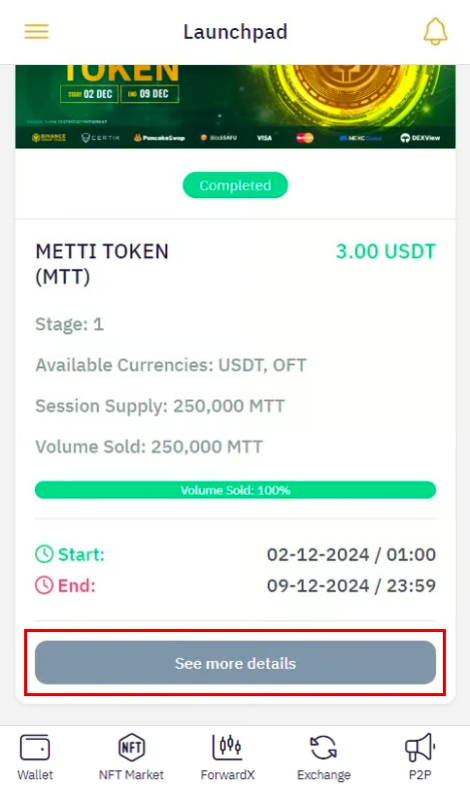
* Tab **Active**: Displays the coin sale programs currently open
* Tab **Completed**: View programs that have concluded
### **B. Main activities**
#### **1. View program details**
* **How to proceed**: Press the **View details** button under each program
* **Displayed information**:
* Operational status (Ongoing/Concluded)
* Schedule:
* Start/end dates
* Final token distribution time
* Action items: Transaction history, Purchase coin.
> **Important notes:**
>
> * Payment is not executed immediately after conclusion
> * Payments will be made in batches or according to a predetermined schedule
#### **2. Check transaction history**
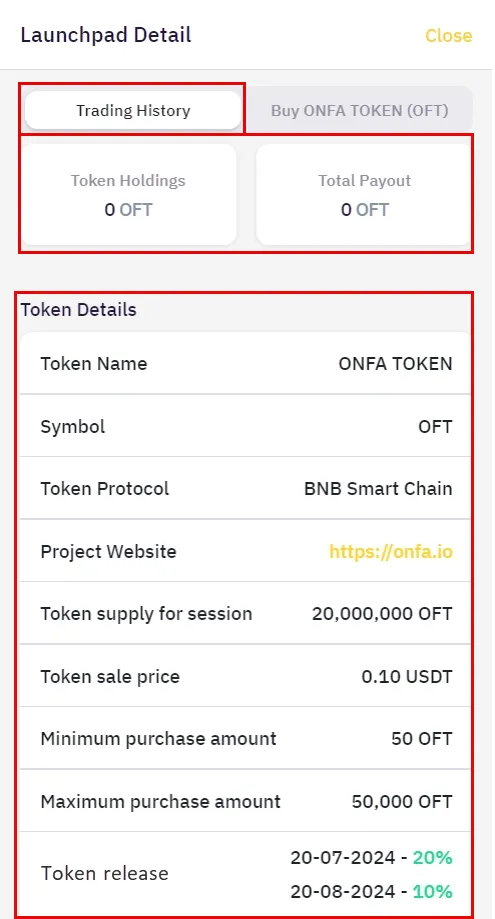
* **How to view**: Select **View transaction history**
* **Displayed information**:
* Number of Tokens held
* Total amount paid
* Token information details
#### **3. Execute Token purchase**
* **How to purchase**: Press **Purchase token** on the detail page
* **Cases**:
* Within validity: Display the **Buy** button with full information
* Expired: Display the message "Program has concluded"
> #### **Important note**
>
> * Sale periods are time-limited
> * Token payment may occur in multiple installments
> * Always verify information carefully before executing a transaction
---
# Agent Instructions
This documentation is published with GitBook. GitBook is the documentation platform designed so that both humans and AI agents can read, navigate, and reason over technical content effectively. Learn more at gitbook.com.
## Querying This Documentation
If you need additional information that is not directly available in this page, you can query the documentation by asking a question.
Perform an HTTP GET request on the following URL with the `ask` and `goal` query parameters:
```
GET https://wiki.onfa.io/wallet/onfa-features/launchpad.md?ask=&goal=
```
`ask` is the immediate question: it should be specific, self-contained, and written in natural language.
`goal` is what the user is ultimately trying to achieve, the reason they need the answer. Sharing it helps GitBook give you a better, more relevant answer. A goal is most helpful when it describes the outcome the user wants rather than restating the question. For example, with `ask=how do I create an API token`, a goal like `automate deployments from our CI pipeline` lets GitBook tailor the answer to that use case.
The response will contain a direct answer to the question and relevant excerpts and sources from the documentation.
Use this mechanism when the answer is not explicitly present in the current page, you need clarification or additional context, or you want to retrieve related documentation sections.