> For the complete documentation index, see [llms.txt](https://wiki.onfa.io/llms.txt). Markdown versions of documentation pages are available by appending `.md` to page URLs; this page is available as [Markdown](https://wiki.onfa.io/wallet/onfa-features/nft-mining.md).
# NFT Mining
Token mining solution via NFTs.
NFT Mining is a feature **exclusive** of ONFA, allowing NFTs to be transformed into automatic token mining machines. With a transparent mechanism and attractive rewards, users can:
* Increase the utility value of the NFT collection.
* Receive periodic rewards in tokens.
* Compete in the system-wide leaderboard.
**Key features**:
* 1 NFT = 1 Worker (Mining device).
* Operates 24/7 without supervision.
* Performance depends on Mining Power.
### A. Feature introduction
#### 1. Overview of the NFT Mining page.
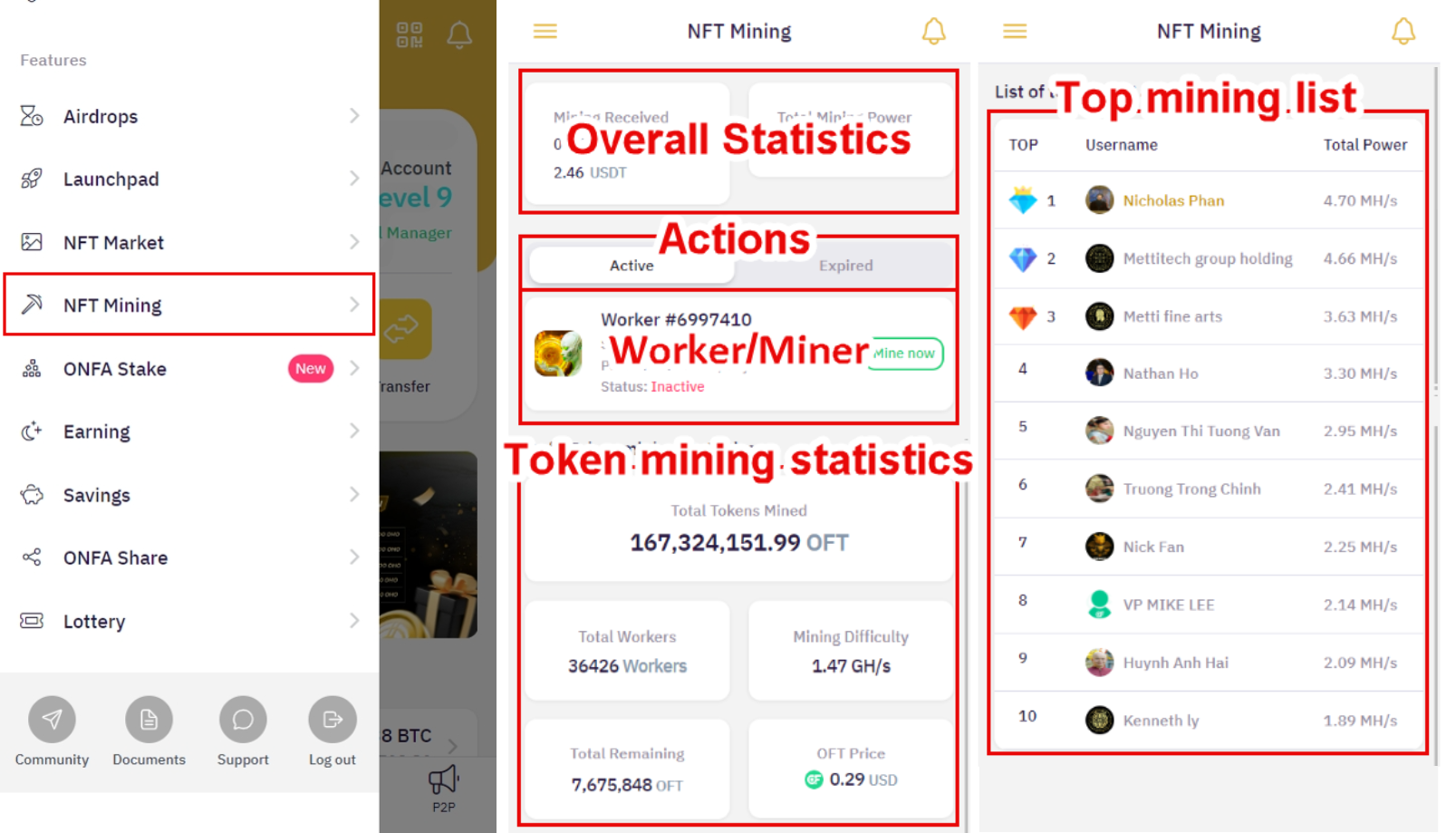
Access the **NFT Mining section** on the menu bar to enter the main interface with the following components:
* **Overview statistics panel**:
* Displays token mining results.
* Tracks performance and accumulation progress.
* **Worker management**:
* Switch between active and expired Workers.
* Check mining status.
* **Mining details**:
* Total tokens obtained.
* Number of Workers in operation.
* Current network difficulty.
* Total tokens available.
* Token exchange rate in fiat currency.
* **Leaderboard**:
* Top 10 users with the best mining performance.
* Assessment of productivity in participating in the system.
#### 2. Operating mechanism of the Worker
**Worker/Miner** (Mining device) is the main component that helps:
* Automate the token mining process.
* Operate continuously after activation.
* Apply a pre-established mining mechanism.
#### 3. Mining capacity (Mining Power)
Each **Worker** possesses:
* An indicator of **individual mining** capacity.
* Higher capacity → Greater mining efficiency.
* Total capacity can be increased by owning multiple Workers.
#### 4. Operation duration
Operational characteristics of the Worker:
* Has a specific usage duration.
* Automatically stops operating when expired.
* Options after expiration:
* Renew the usage period (if supported).
* Add **Worker** new
#### 5. Operational procedure
Throughout the operation cycle, the Worker will:
* **Automatically mine tokens** according to the assigned capacity.
* Continuously update:
* Operational status.
* Mining yield in real time.
* Performance is affected by:
* Mining difficulty.
* Total available token supply.
* Token price volatility.
### B. Guide to main operations
#### 1. Activate the mining device (Worker)
To begin participating in the NFT Mining system, you need to:
* **Own a qualifying NFT**:
* Each qualifying NFT is accompanied by 1 Worker.
* Access **NFT Market** to select and purchase a suitable NFT.
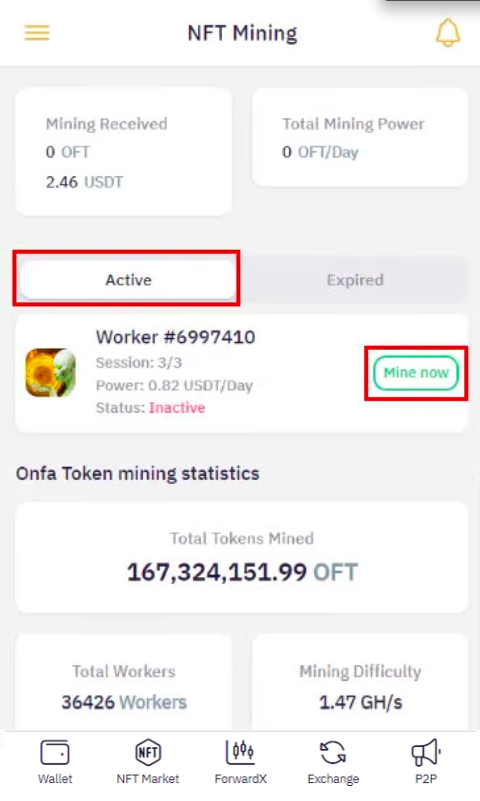
* **Activate the Worker**:
* After successfully purchasing the NFT, go to the **NFT Mining page.**
* Click **"Start Mining"** for **Worker** that has not been activated.
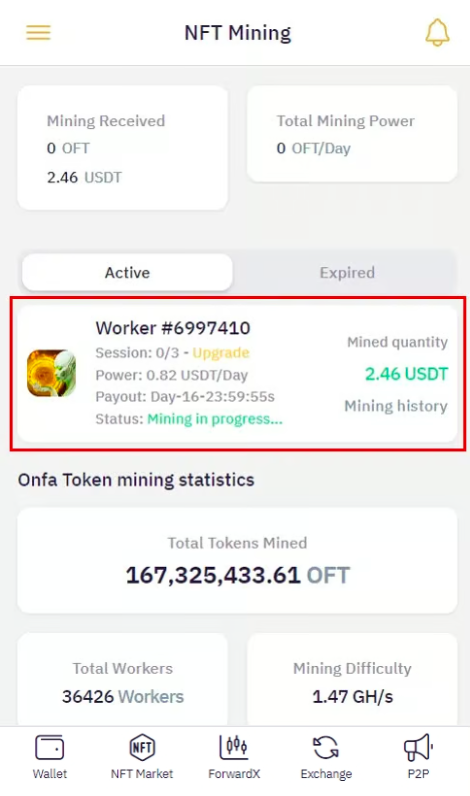
* Check the information **Worker** in operation:
* Active session (remaining mining time).
* Mining Power.
* Most recent reward claim date.
* Operational status.
* Mining history.
#### 2. Monitor mining history
* Select the Worker you want to check.
* Click **"Mining history".**
* View details:
* Tokens received per cycle.
* Reward receipt times.
* Mining performance across periods.
#### 3. Manage expired Workers
* Go to the **"Expired Worker" section.**
* For each Worker:
* **Can be renewed**: Click the "Renew" button and follow the instructions.
* **Cannot be renewed**:
* Click **"Purchase a new NFT"** to navigate to **NFT Market.**
* Select an NFT to receive a new Worker.
> **Important note**:
>
> * Expired Workers will cease operation entirely.
> * Always check the remaining operation time of Workers.
#### 4. Optimize mining performance
* **Combine multiple Workers**:
* Own multiple Workers to increase mining capacity.
* **Monitor the leaderboard**:
* Learn from Top Miners.
* Adjust strategies accordingly.
{% hint style="info" %}
**Tips**:
* Prioritize Workers with longer operational durations.
* Balance the quantity and quality of Workers.
{% endhint %}
---
# Agent Instructions
This documentation is published with GitBook. GitBook is the documentation platform designed so that both humans and AI agents can read, navigate, and reason over technical content effectively. Learn more at gitbook.com.
## Querying This Documentation
If you need additional information that is not directly available in this page, you can query the documentation by asking a question.
Perform an HTTP GET request on the following URL with the `ask` and `goal` query parameters:
```
GET https://wiki.onfa.io/wallet/onfa-features/nft-mining.md?ask=&goal=
```
`ask` is the immediate question: it should be specific, self-contained, and written in natural language.
`goal` is what the user is ultimately trying to achieve, the reason they need the answer. Sharing it helps GitBook give you a better, more relevant answer. A goal is most helpful when it describes the outcome the user wants rather than restating the question. For example, with `ask=how do I create an API token`, a goal like `automate deployments from our CI pipeline` lets GitBook tailor the answer to that use case.
The response will contain a direct answer to the question and relevant excerpts and sources from the documentation.
Use this mechanism when the answer is not explicitly present in the current page, you need clarification or additional context, or you want to retrieve related documentation sections.