> For the complete documentation index, see [llms.txt](https://wiki.onfa.io/llms.txt). Markdown versions of documentation pages are available by appending `.md` to page URLs; this page is available as [Markdown](https://wiki.onfa.io/wallet/onfa-forwardx/experience-onfa-forwardx.md).
# Experience ONFA ForwardX
Testing Mode - How to Use Leverage - Important Notes
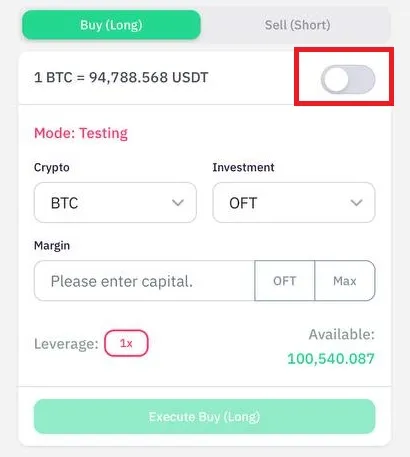
### **1. Testing Mode - Risk-free trial trading**
#### **Main features:**
* All accounts default to **Testing** (using virtual points)
* Press the button to switch to **Isolated Margin** (real-money trading)
#### **Benefits of using Testing:**
* Practice trading with provided virtual funds
* Freely test strategies without risking capital
* Orders **Long/Short** exist only for **1 hour** → Train quick response
* Automatically close orders after 1 hour → Understand position management mechanisms
**\*Note:**
* Price data is real-time but does not affect real accounts
* Suitable for beginners or strategy testing
### **2. How to adjust leverage**
#### **Procedure:**
1. Default leverage **1x**, maximum **100x**
2. Click the red-marked box → Display a slider popup\

3. Drag the slider to select the desired leverage level\

#### **Leverage principles:**
* **The larger the position** → Available leverage **the lower**
* **The smaller the position** → Available leverage **the higher**
**Advice:**
* High leverage (e.g., 50x–100x) → Significantly increased liquidation risk
* Always use **Stop-Loss orders** to control risk
***
#### **Quick summary**
| Feature | Description |
| ---------------- | ------------------------------------------------------ |
| **Testing Mode** | Virtual-money trading; orders auto-cancel after 1 hour |
| **Leverage** | From 1x–100x, adjusted via slider |
| **Risk** | Higher leverage → Greater liquidation risk |
> **Final note:**
>
> * Switch to **Isolated Margin** only when proficient
> * Always test strategies before using real funds
---
# Agent Instructions
This documentation is published with GitBook. GitBook is the documentation platform designed so that both humans and AI agents can read, navigate, and reason over technical content effectively. Learn more at gitbook.com.
## Querying This Documentation
If you need additional information that is not directly available in this page, you can query the documentation by asking a question.
Perform an HTTP GET request on the following URL with the `ask` and `goal` query parameters:
```
GET https://wiki.onfa.io/wallet/onfa-forwardx/experience-onfa-forwardx.md?ask=&goal=
```
`ask` is the immediate question: it should be specific, self-contained, and written in natural language.
`goal` is what the user is ultimately trying to achieve, the reason they need the answer. Sharing it helps GitBook give you a better, more relevant answer. A goal is most helpful when it describes the outcome the user wants rather than restating the question. For example, with `ask=how do I create an API token`, a goal like `automate deployments from our CI pipeline` lets GitBook tailor the answer to that use case.
The response will contain a direct answer to the question and relevant excerpts and sources from the documentation.
Use this mechanism when the answer is not explicitly present in the current page, you need clarification or additional context, or you want to retrieve related documentation sections.